For shop owners

Put your shop in every customer’s pocket.

Tech Plaza gives your plaza shop a storefront customers can browse from home. They see your products and prices, message you with questions, and walk in ready to buy.

Coming soon onGoogle Play
Talk to us
to list your shop
Rs 0
commission on sales
0%
photos per product
5–7
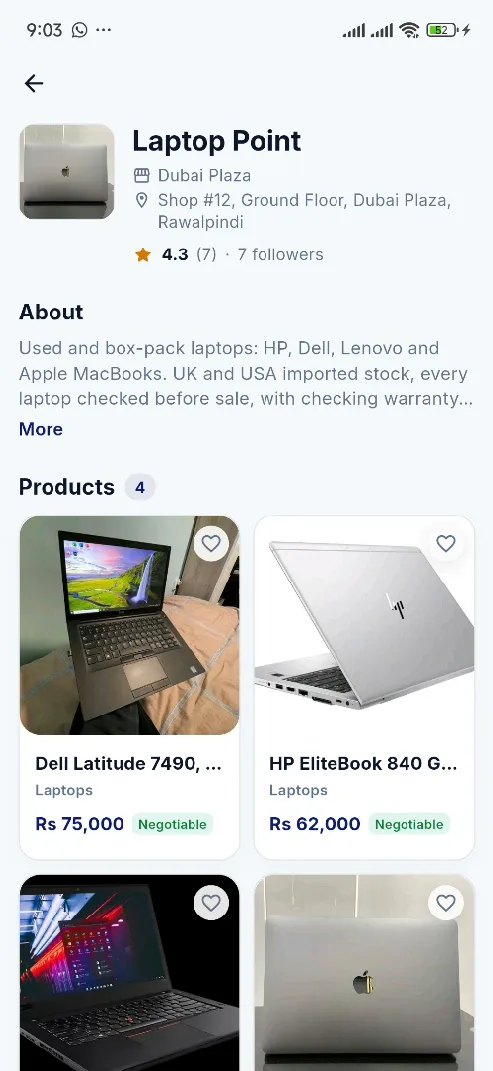
A shop page as customers see it
Shop owner dashboard

Getting started

From sign-up to first customer

Everything happens in the app. We review each shop by hand so customers can trust every listing, including yours.

  1. Step 1

    Sign up as a shop owner

    Download the app, choose “Shop owner” and register with email or Google.

  2. Step 2

    Add your shop and CNIC

    Enter your shop name, plaza and shop number, then upload your CNIC so we can verify you.

  3. Step 3

    We review your shop

    Our team checks your details. If something is missing, we tell you exactly what to fix.

  4. Step 4

    List your products

    Add photos, a price and a description. Each listing goes live once it has been reviewed.

  5. Step 5

    Reply to customers

    Buyers find your products and message you. Answer in the app and welcome them to your shop.

You always know where you stand

  • Pending We’re reviewing your shop.
  • Needs changes We tell you what to fix, and you resubmit.
  • Active Your dashboard opens and you can start listing.

Built for shopkeepers

Simple tools that fit in your pocket

No laptop or website needed. If you can use WhatsApp, you can run your Tech Plaza shop.

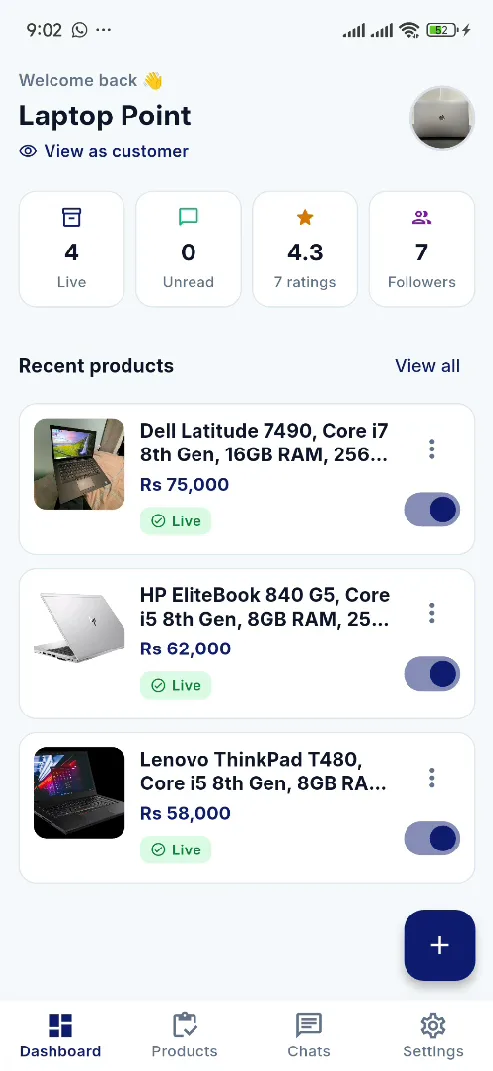
Dashboard showing 4 live products, 0 unread chats, a 4.3 rating and 7 followers

Dashboard

Your shop at a glance

Open the app and see how many listings are live, which chats are waiting, your rating and how many people follow you.

  • Live listings, unread chats, rating and followers
  • Recent products with a live/hidden switch
  • “View as customer” to see your shop the way buyers do
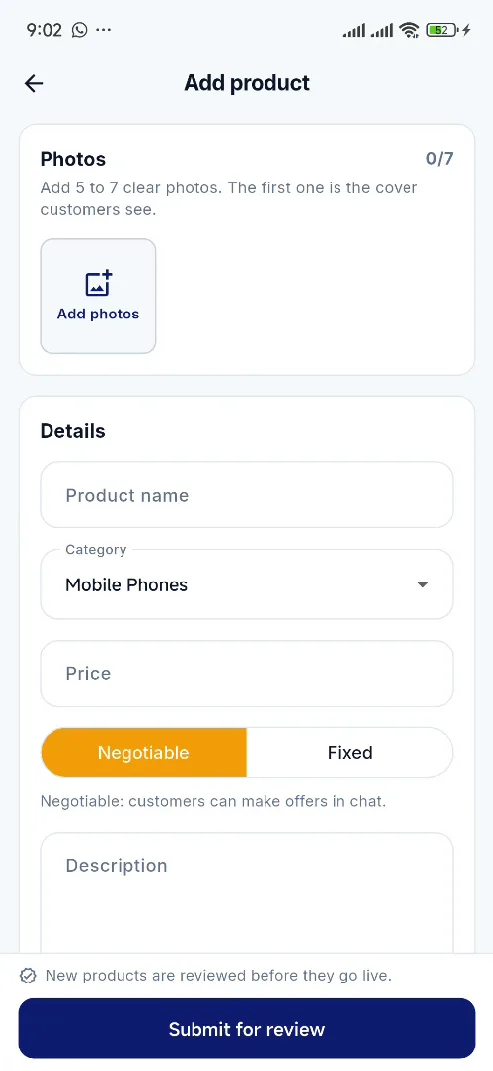
Add product form with photos, name, category, price and description

Listings

Add a product in a minute

Take photos with your phone, add a price and a short description, and submit. We compress the photos so they load fast for customers.

  • 5 to 7 photos, the first one is the cover
  • Negotiable or fixed price
  • Pick a category so buyers can find it
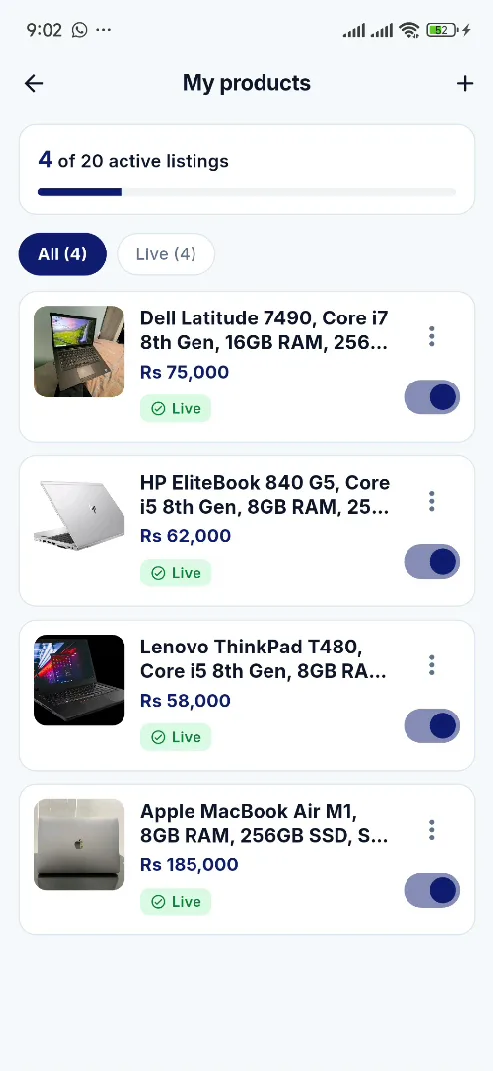
My products screen with four live listings and their toggles

Inventory

Keep your stock up to date

Sold the last one? Switch the listing off. Back in stock? Switch it on again. Your listing count is always shown, so there are no surprises.

  • One-tap live or hidden
  • Filter by live, hidden or awaiting approval
  • Edit price and details at any time

Pricing

Free. Completely.

No listing fees, no commission on your sales, no card needed. Just a real shop and your CNIC.

  • Shop pageLogo, location, description and every product.
  • Product listingsAdd, edit, hide and relist in one tap.
  • Customer chatReal-time messages with push notifications.
  • Ratings & followersA reputation customers can see.

Shop owner FAQ

Questions, answered

What do I need to list my shop?

A physical shop in one of our plazas, your CNIC, and an Android phone. Sign up in the app as a shop owner and fill in your shop details.

How long does approval take?

We aim to review new shops within one to two working days. You can see your status in the app at any time, and if we need changes we tell you why.

Why are my products reviewed?

So customers only see real, accurately described items. Most listings are approved quickly. If one is rejected, you get feedback and can edit it.

How much does it cost?

Nothing. Listing your shop and products on Tech Plaza is free, with no commission on your sales.

How many products can I list?

Your dashboard shows how many listings are live and how many more you can add. Hidden listings stay saved and can go live again in one tap.

Can I see who follows my shop?

You see how many people follow your shop. To protect customers’ privacy, follower names are not shown.

Still have a question?

Visit the help centre

Ready to bring more customers to your counter?

Email us and we’ll help you set up your shop, or download the app as soon as it’s on Google Play.

Coming soon onGoogle Play
List my shop